

Overview
The Job Manager frontend is built using a Headless UI Architecture with Next.js, separating business logic (hooks) from visual presentation (UI components). This page provides detailed C4 component diagrams for each feature module.All feature modules share common infrastructure: Fetcher Utilities for API calls, Constants Manager for URLs, and the bamboo-ui shared component library.
Architecture Pattern
Headless Hooks
Encapsulate business logic, state management, and event handlers without rendering UI
UI Components
Reusable visual primitives from bamboo-ui that consume hooks for behavior
Feature Services
API integration layer using Fetcher Utilities for backend communication
Validation Schemas
Zod schemas for client-side validation of form inputs
Common Infrastructure
All feature components connect to these shared containers:| Container | Technology | Purpose |
|---|---|---|
| Page | Next.js | Root page container and routing |
| Fetcher Utilities | TypeScript | HTTP/HTTPS requests to backend |
| Constants Manager | TypeScript | Centralized URL and config management |
| bamboo-ui | React + TailwindCSS | Shared UI component library |
Signup Component
Implements multi-path registration flow with credentials and Google SSO support. By leveraging a Headless UI pattern, the Next.js page remains a pure composition layer that delegates validation and API interactions to specialized hooks and services.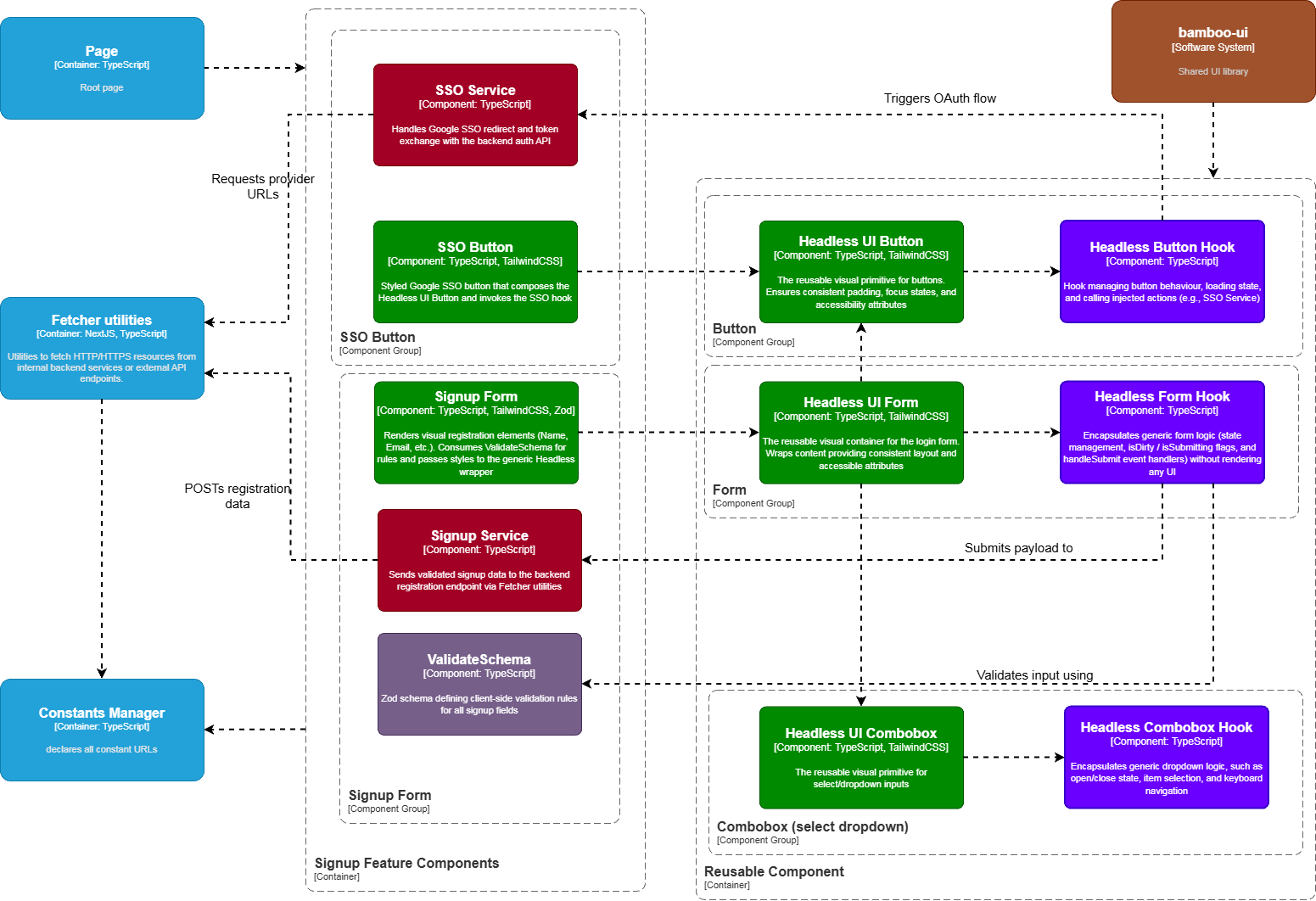
Component Breakdown
Signup Service
Signup Service
Encapsulates the specific business logic for creating a new company account. Prepares the data payload and manages success/error redirection.
- Internal: Calls Fetcher Utilities to submit data
- External: Indirectly communicates with the Identity Provider via the fetcher to persist the new user
Signup UI Form
Signup UI Form
Renders the visual registration form elements (Company Name, Email, Password, Country Listbox).
- Internal: Consumes ValidateSchema for validation rules and passes specific field children/styles to the generic Headless UI Form wrapper
- Displays real-time validation feedback
ValidateSchema
ValidateSchema
Defines the strict Zod validation rules for registration (e.g., “Password must have 1 special char”, “Phone must be digits”).
- Internal: Used strictly by Signup UI Form to validate form state before submission is allowed, isolating validation logic from UI rendering
SSO Service
SSO Service
Manages the OAuth 2.0 handshake logic for third-party providers. Constructs the correct authorization URLs.
- Internal: Calls Fetcher Utilities to retrieve provider-specific redirect URLs
- External: Initiates the browser redirect to external Identity Providers (e.g., Google)
SSO UI Button
SSO UI Button
Reusable Components
| Component | Hook | Purpose |
|---|---|---|
| Headless UI Button | Headless Button Hook | Consistent button behavior, preventing double-clicks while loading |
| Headless UI Form | Headless Form Hook | Form state, isDirty, isSubmitting flags, handleSubmit handlers |
| Headless UI Combobox | Headless Combobox Hook | Country selection dropdown with search |
Login Component
Facilitates secure authentication with credentials and Google SSO. Mirroring the signup architecture, the Next.js page functions as a strict composition layer, delegating complex authentication state and token management to specialized Services and Headless Hooks.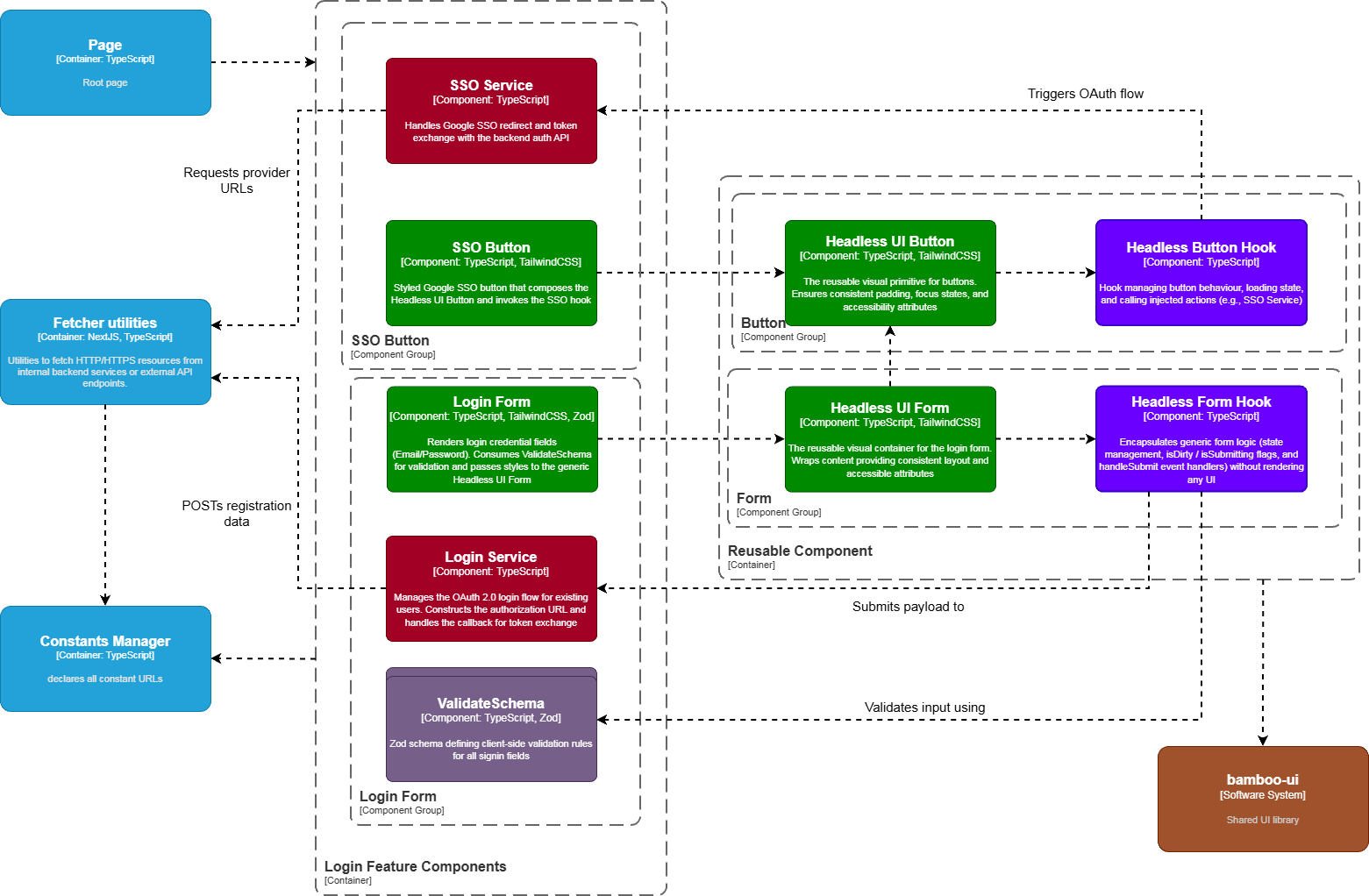
Component Breakdown
Signin Service
Signin Service
Centralizes the business logic for user authentication. It manages the lifecycle of JWS/JWE tokens (storage and retrieval) and handles navigation upon successful login.
- Internal: Calls Fetcher Utilities to verify credentials; interacts with the session state
- External: Indirectly communicates with the Backend Auth Service to validate credentials and retrieve session tokens
Signin UI Form
Signin UI Form
Renders the login credential fields (Email and Password).
- Internal: Consumes ValidateSchema for input validation and passes specific styling/children to the generic Headless UI Form wrapper
- Displays authentication errors (e.g., “Invalid credentials” or “Account locked”)
ValidateSchema
ValidateSchema
Defines the Zod schema specifically for login (e.g., Email syntax validation and non-empty Password checks).
- Internal: Used by Signin UI Form to validate inputs in real-time before the API request is formed, reducing unnecessary network traffic
SSO Service
SSO Service
Manages the OAuth 2.0 login flow for existing users. Constructs the authorization URL and handles the callback for token exchange.
- Internal: Calls Fetcher Utilities to get provider URLs
- External: Redirects the user to the Identity Provider (Google) for authentication
SSO UI Button
SSO UI Button
Reusable Components
| Component | Hook | Purpose |
|---|---|---|
| Headless UI Button | Headless Button Hook | Button behavior and loading states |
| Headless UI Form | Headless Form Hook | Form submission and validation |
Dashboard Component
Central operational hub aggregating KPIs, recent job posts, notifications, and quick actions. It orchestrates multiple data streams, simultaneously fetching KPI metrics, recent job postings, and system notifications. It utilizes a modular widget architecture, allowing distinct data cards to load independently to optimize the “First Contentful Paint” performance metrics.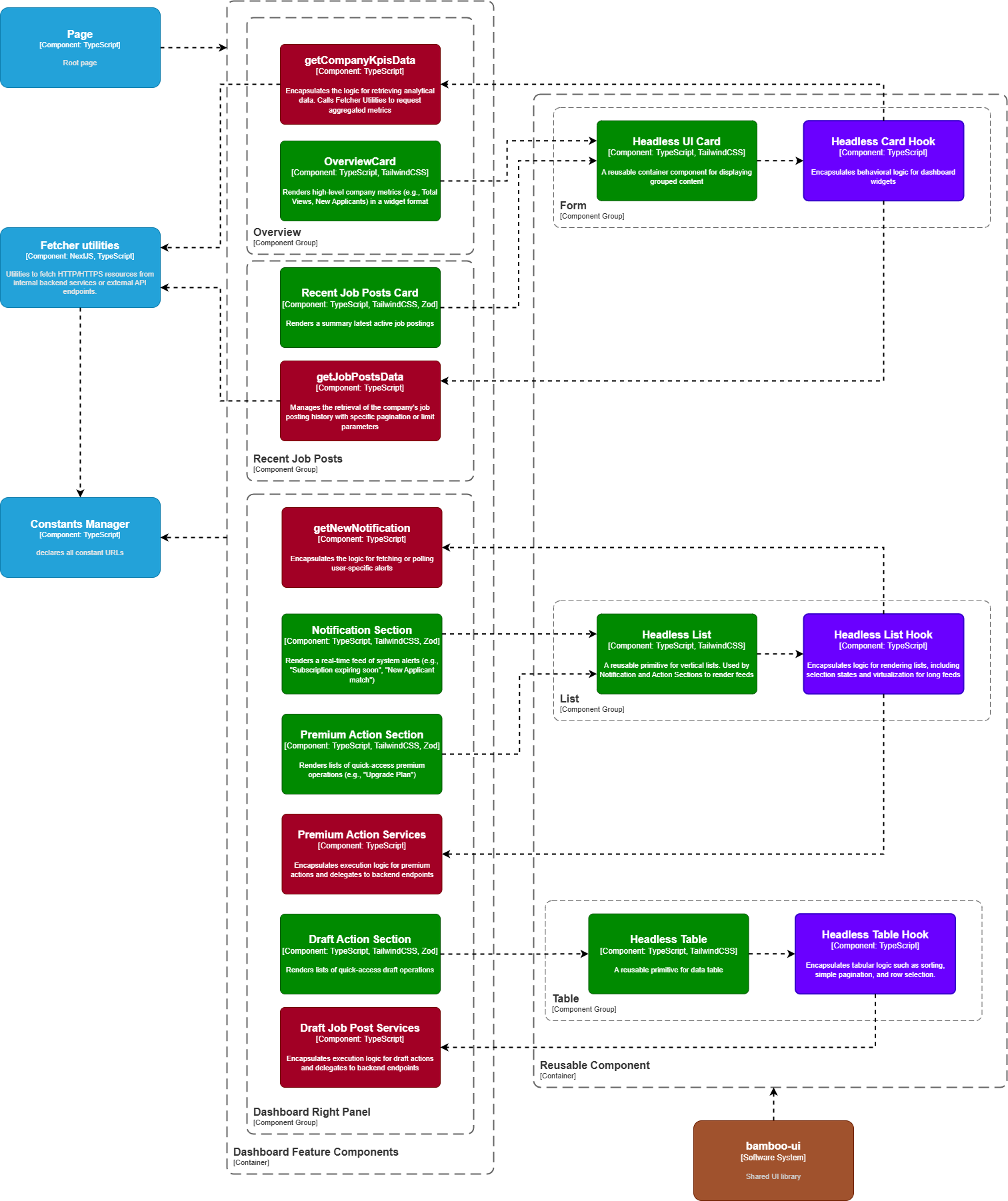
Component Breakdown
Overview Card
Overview Card
Renders high-level company metrics (e.g., Total Views, New Applicants) in a widget format.
- Internal: Consumes the generic Headless UI Card for layout and style consistency
- Displays data provided by the getCompanyKpisData service
getCompanyKpisData
getCompanyKpisData
Encapsulates the logic for retrieving analytical data.
- Internal: Calls Fetcher Utilities to request aggregated metrics
- External: Fetches real-time statistical data from the Backend Analytics Service
Recent Job Posts Card
Recent Job Posts Card
Renders a summary snapshot of the latest active job postings.
- Internal: Uses the Headless UI Table to display structured data (Title, Posted Date, Status)
- Consumes data from getJobPostsData
getJobPostsData
getJobPostsData
Manages the retrieval of the company’s job posting history.
- Internal: Calls Fetcher Utilities with specific pagination or limit parameters (e.g., limit=5) for the dashboard view
Notification Section
Notification Section
Renders a real-time feed of system alerts (e.g., “Subscription expiring soon”, “New Applicant match”).
- Internal: Consumes the Headless UI List to render individual notification items fetched by getNewNotification
getNewNotification
getNewNotification
Encapsulates the logic for fetching or polling user-specific alerts.
- Internal: Calls Fetcher Utilities to check for unread messages
Action Sections (Premium & Draft)
Action Sections (Premium & Draft)
Reusable Components
| Component | Hook | Purpose |
|---|---|---|
| Headless UI Card | Headless Card Hook | Dashboard widget containers, loading states |
| Headless UI List | Headless List Hook | Notification and action feeds, virtualization |
| Headless UI Table | Headless Table Hook | Job posts data table with sorting |
Profile Component
Manages the Company Profile capabilities, allowing users to view and edit their public presence. The architecture splits the profile into logical sections: Header (Branding), Info (Contact Details), and Media (Gallery), orchestrated by a thin Next.js page.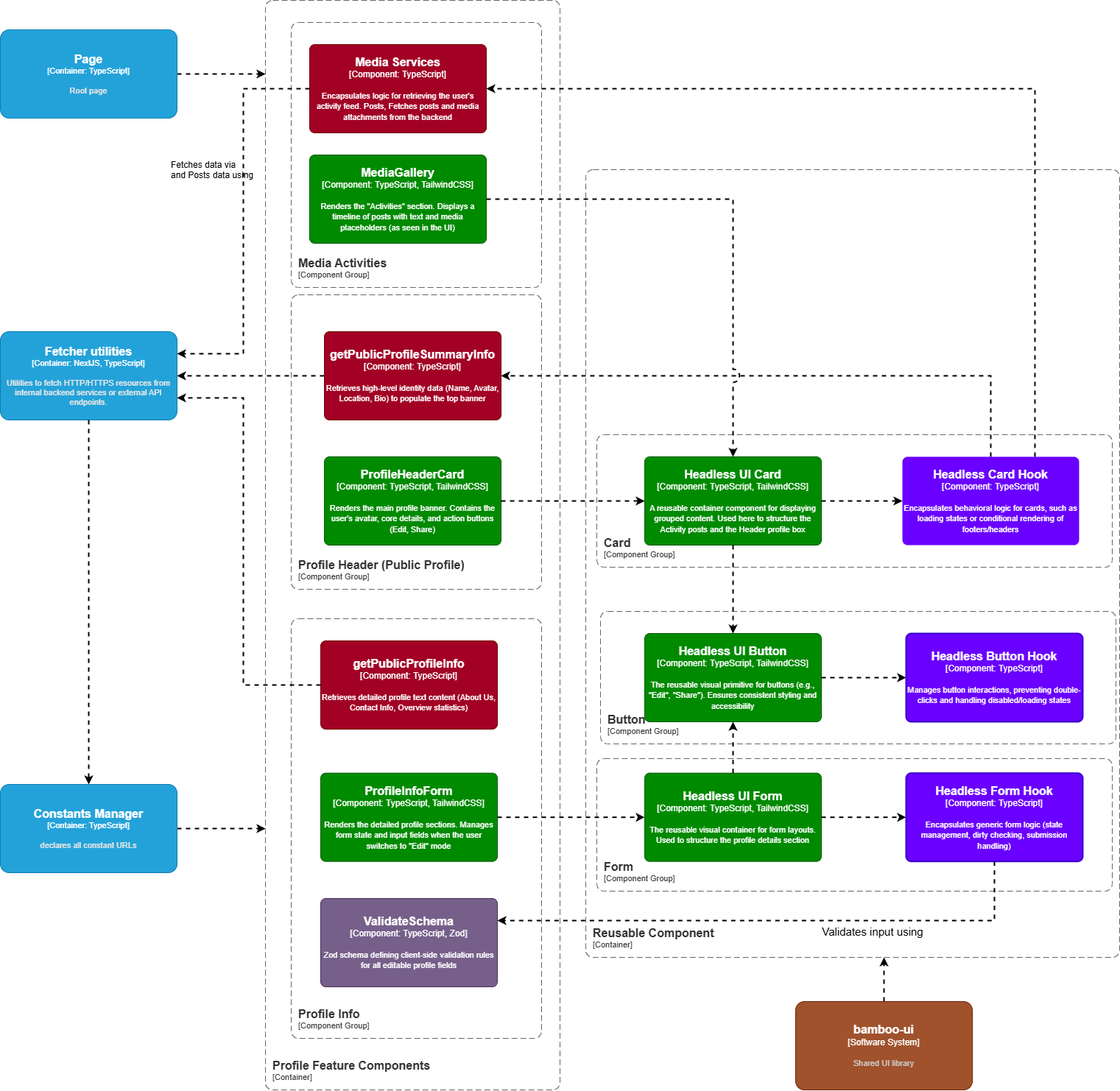
Component Breakdown
Media Services
Media Services
Encapsulates business logic for media management, such as uploading company culture videos or event photos.
- Internal: Calls Fetcher Utilities to handle multipart file uploads
- External: Interacts with the Backend (and potentially object storage like GCS) to persist media assets
Media Gallery
Media Gallery
Renders a grid of company images and videos.
- Internal: Consumes the Headless UI Card to display individual media items
- Provides UI controls for adding or removing items via Media Services
getPublicProfileSummaryInfo
getPublicProfileSummaryInfo
A specialized service component responsible for retrieving high-level branding data (Logo, Name, Bio).
- Internal: Calls Fetcher Utilities with the company ID
- External: Sends a GET request to the backend profile summary endpoint
Profile Header Card
Profile Header Card
Renders the public-facing company header, including the logo and “About Us” section.
- Internal: Consumes the Headless UI Card for layout and style
- Displays data fetched by getPublicProfileSummaryInfo
getPublicProfileInfo
getPublicProfileInfo
A specialized service component responsible for fetching detailed contact and operational information.
- Internal: Calls Fetcher Utilities to populate the Profile Info Form with existing data
Profile Info Form
Profile Info Form
Renders the editable form for core company details (Email, Phone, Address, City).
- Internal: Consumes ValidateSchema for input rules and passes specific fields to the generic Headless UI Form
- Binds submission events to the update logic
ValidateSchema
ValidateSchema
Defines strict Zod validation rules for profile fields (e.g., “Phone number must start with a valid dial code”, “City is required”).
- Internal: Used strictly by Profile Info Form to validate state before submission
Reusable Components
| Component | Hook | Purpose |
|---|---|---|
| Headless UI Card | Headless Card Hook | Profile section containers, collapsible sections |
| Headless UI Button | Headless Button Hook | Edit/Share action buttons |
| Headless UI Form | Headless Form Hook | Profile editing form |
Subscription Component
Facilitates the monetization workflow, allowing companies to upgrade their accounts to unlock premium features such as real-time notifications and advanced headhunting tools. The architecture handles sensitive payment flows securely by isolating the transaction logic within the Payment Service.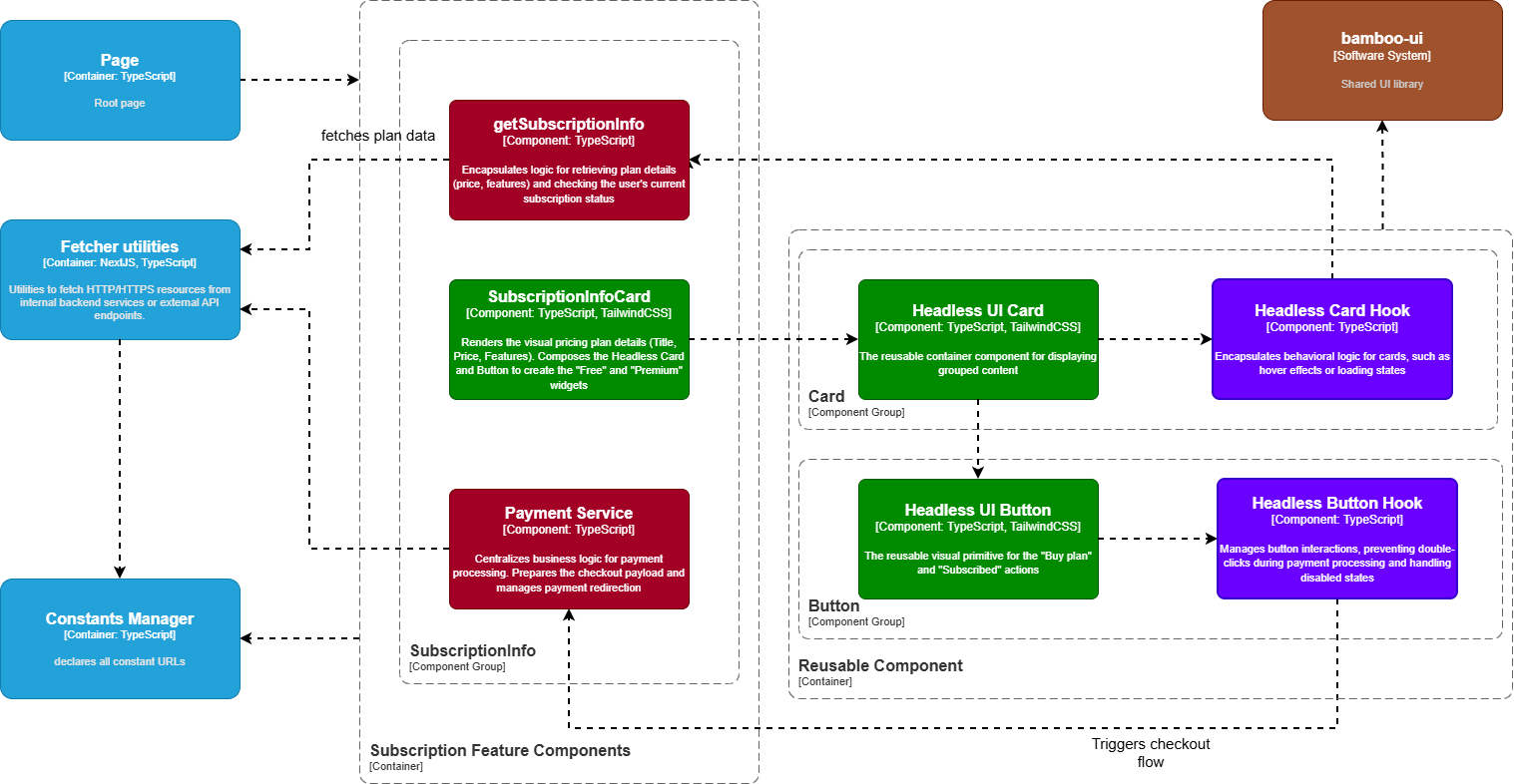
Component Breakdown
getSubscriptionInfo
getSubscriptionInfo
Encapsulates the logic for retrieving the company’s current subscription status (Free vs. Premium), expiration date, and transaction history.
- Internal: Calls Fetcher Utilities to request account data
Subscription Info Card
Subscription Info Card
Renders the pricing details ($30/month), plan benefits, and status.
- Internal: Consumes the Headless UI Card for layout consistency
- Displays data provided by getSubscriptionInfo
Payment Service
Payment Service
Centralizes the business logic for initiating transactions. It handles the “Upgrade” workflow, interacting with the backend to generate checkout sessions for third-party gateways (e.g., Stripe/PayPal).
- Internal: Calls Fetcher Utilities to post payment requests
- External: Redirects the user to the secure payment gateway URL upon success
Reusable Components
| Component | Hook | Purpose |
|---|---|---|
| Headless UI Card | Headless Card Hook | Plan comparison cards, loading states |
| Headless UI Button | Headless Button Hook | ”Upgrade Now” with loading state to prevent double-charging |
Payment Flow
Job Post Management Component
Handles the core recruitment workflow: creation, editing, skill tagging, and application tracking. The architecture orchestrates three distinct functional areas—Job Information (Metadata), Skill Tagging (Taxonomy), and Application Tracking (Candidate Review)—within a unified interface.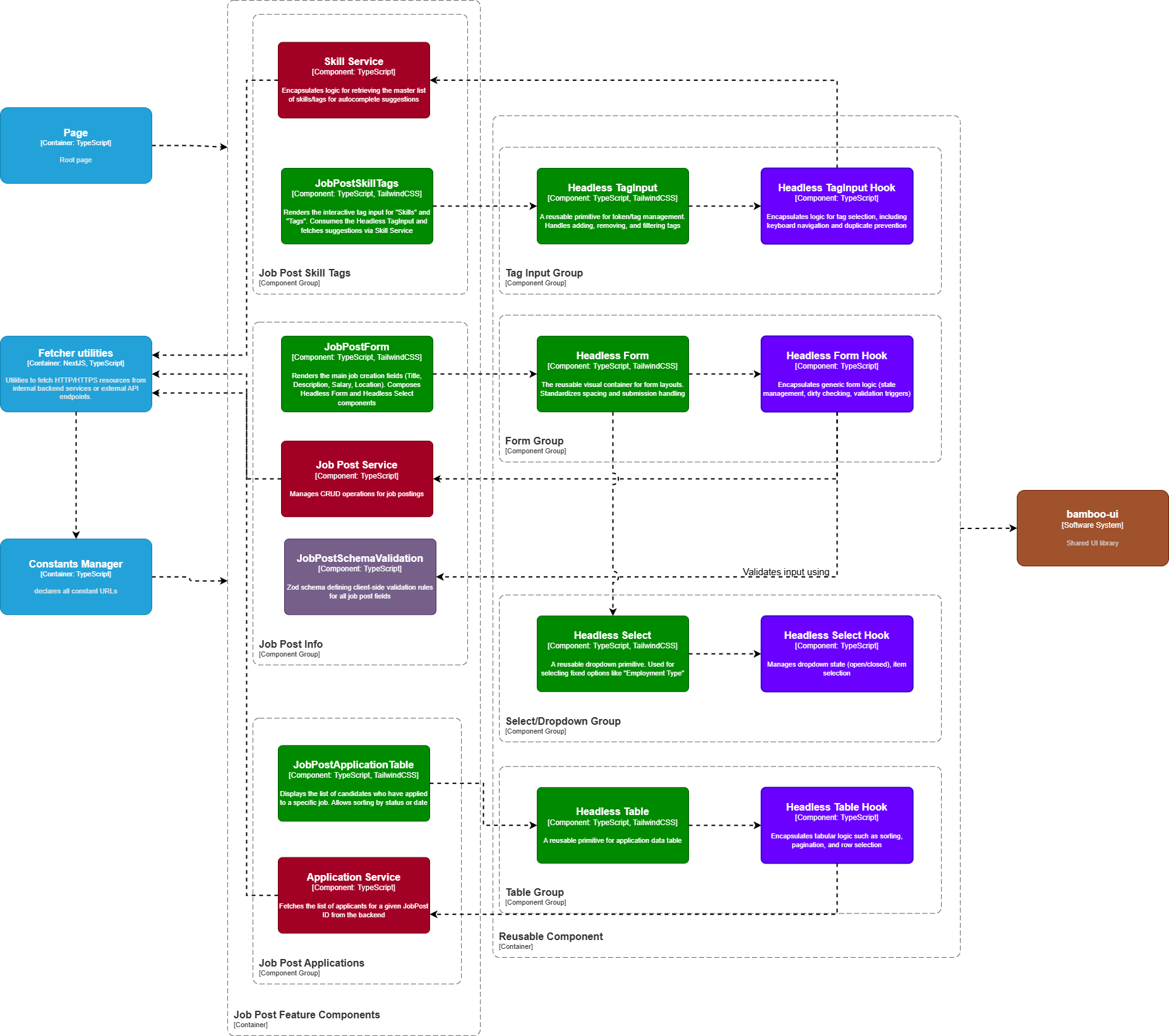
Component Breakdown
Job Post Service
Job Post Service
Encapsulates the business logic for the job lifecycle (Create, Update, Publish, Archive).
- Internal: Calls Fetcher Utilities with the payload from the form
- External: Communicates with the Backend to persist job data and trigger Kafka events for applicant matching
Job Post Form
Job Post Form
Renders the primary job details fields (Title, Description, Salary Range, Employment Type).
- Internal: Consumes JobPostSchemaValidation for rules and passes specific field children to the generic Headless Form wrapper
JobPostSchemaValidation
JobPostSchemaValidation
Defines strict Zod validation rules for job posts (e.g., “Salary Max must be greater than Min”, “Expiry date must be in the future”).
- Internal: Used strictly by Job Post Form to validate state before submission
Skill Service
Skill Service
Manages the taxonomy of technical skills.
- Internal: Calls Fetcher Utilities to search or retrieve standard skill tags (e.g., “Python”, “React”)
Job Post Skill Tags
Job Post Skill Tags
Application Service
Application Service
Manages the retrieval of candidate applications for a specific job post.
- Internal: Calls Fetcher Utilities to get the list of applicants, their CVs, and status (Pending/Archived)
Job Post Application Table
Job Post Application Table
Renders the list of applicants, allowing recruiters to review and filter candidates.
- Internal: Consumes the Headless Table to display data
- Provides actions to view CVs or change application status
Reusable Components
| Component | Hook | Purpose |
|---|---|---|
| Headless TagInput | Headless TagInput Hook | Skill tag management (add, remove, duplicate prevention) |
| Headless Form | Headless Form Hook | Job creation form state |
| Headless Select | Headless Select Hook | Employment type dropdown (single/multi-select) |
| Headless Table | Headless Table Hook | Application data table with sorting, pagination |
Applicant Search Component
Powers the “Headhunting” engine, enabling companies to discover talent by filtering across technical skills, location, and education. The architecture centralizes complex query logic within the Search Orchestrator Service, which aggregates criteria from various UI inputs.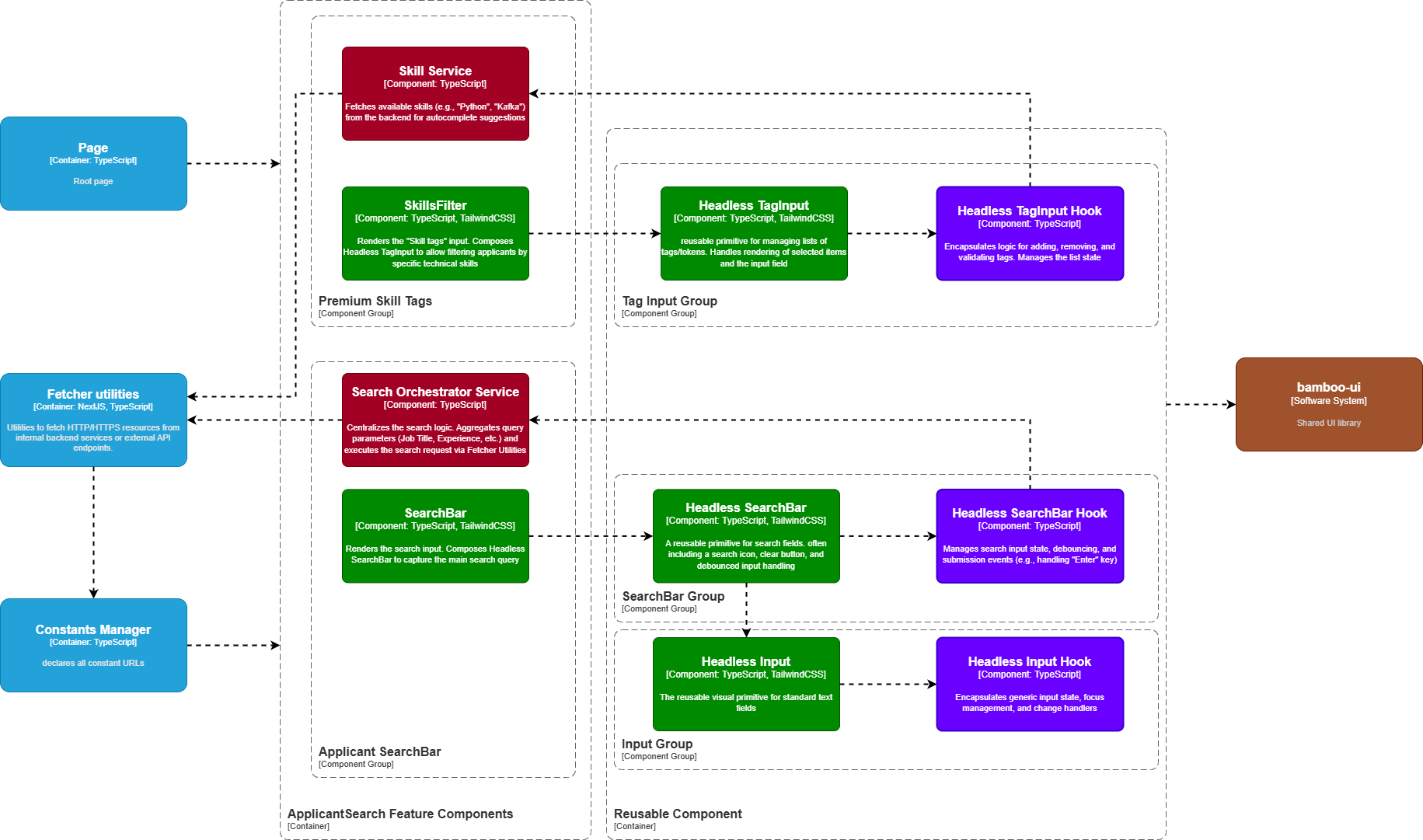
Component Breakdown
Search Orchestrator Service
Search Orchestrator Service
Encapsulates the business logic for building and executing complex search queries. It aggregates state from the Search Bar, Filters, and Skill Tags into a single payload.
- Internal: Calls Fetcher Utilities to perform the search
- External: Communicates with the Backend (optimized for Full-Text Search) to retrieve matching candidates
SearchBar
SearchBar
Renders the primary keyword input field (e.g., for Job Titles).
- Internal: Consumes the Headless SearchBar to handle user input and debouncing
- Passes the final query term to the Search Orchestrator Service
Filter
Filter
Renders secondary criteria inputs (Location, Education, Experience).
- Internal: Consumes the generic Headless Input for text fields
- Binds changes to the search state
Skill Service
Skill Service
Manages the retrieval of available technical skill tags for the filter.
- Internal: Calls Fetcher Utilities to get the list of standard skills (e.g., “React”, “Java”) to populate autocomplete suggestions
SkillsFilter
SkillsFilter
Renders the multi-select interface for filtering candidates by tech stack.
- Internal: Consumes the Headless TagInput to allow users to select multiple competencies (e.g., “Python” AND “Kafka”)
Reusable Components
| Component | Hook | Purpose |
|---|---|---|
| Headless SearchBar | Headless SearchBar Hook | Debouncing (delay API call until typing stops), history |
| Headless TagInput | Headless TagInput Hook | Multi-select skill filtering (add, remove, clear all) |
| Headless Input | Headless Input Hook | Standard text filter fields (validation, state binding) |
Search Flow
Headless UI Component Library
All feature modules share these reusable headless components from bamboo-ui:| Component | Hook | Use Cases |
|---|---|---|
| Headless UI Button | Headless Button Hook | All clickable actions |
| Headless UI Form | Headless Form Hook | All form submissions |
| Headless UI Card | Headless Card Hook | Dashboard widgets, profile sections |
| Headless UI Combobox | Headless Combobox Hook | Country selection |
| Headless Select | Headless Select Hook | Dropdown menus |
| Headless TagInput | Headless TagInput Hook | Skill tag management |
| Headless SearchBar | Headless SearchBar Hook | Search inputs with debounce |
| Headless Input | Headless Input Hook | Standard text inputs |
| Headless List | Headless List Hook | Notification feeds |
| Headless Table | Headless Table Hook | Data tables with sorting |